

.png)


SDVOE
AV Over IP Solution
1: OVERVIEW
IPS delivers a true 4K AV over IP solution with zero compression and zero latency, featuring unmatched I/O density, shared infrastructure, flexible I/O, and built-in scalability. The IPS-M AVLink controller provides an efficient way to configure the AV over IP system with IPS-TX and IPS-RX devices. As an API-based command server, IPS-M allows easy configuration of connected devices via a PC and monitors the status of each device across the network.
Figure 1-5 IPS-M

Figure 1-1 IPS-TF
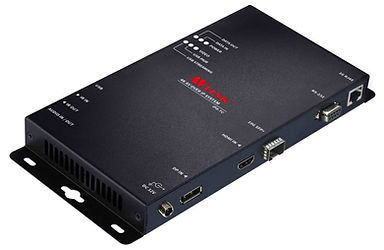
Figure 1-2 IPS-TC
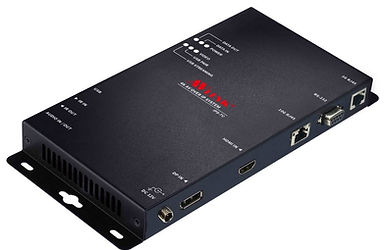
Figure 1-3 IPS-RF
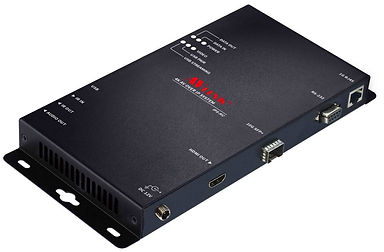
Figure 1-4 IPS-RC
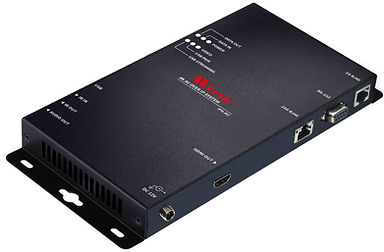
Packing

2: FEATURES
HDMI Input
-
True 4K/60 4:4:4 and HDR
-
HDMI 2.0 compatible input port
-
Support HDCP 1.4 and 2.2
HDMI Output
-
True 4K/60 4:4:4 and HDR
-
HDMI 2.0 compatible output port
-
Support HDCP 1.4 and 2.2
10G-SFP+Transport
-
XFI interface
-
10GBASE-T up to 100 m over Cat 6a cable
-
Multi-mode fiber up to 300/500 m with OM3/OM4 fiber
-
Single-mode fiber up to 30 km
Video Routing
-
Lightweight 1.4:1 artifact-free compression
-
Source switching time of under 100 milliseconds
Audio Routing
-
Lossless audio transmission
-
HDMI downmixed stereo channel support
1G Control Interface
-
Extension of Gigabit Ethernet data network
-
Built-in Ethernet switch connects 1GbE Ethernet to 10GbE interface
-
Device Control
USB Routing
-
Up to 480 Mbps
RS232 Routing
-
Baud rate up to 115200 bps
-
Unicast and broadcast routing between devices
-
Serial data routing between multiple devices
IR Routing
-
IR data routing between multiple devices
Video Scaling
-
Upscaling (TV wall) and downscaling (Multi-view)
-
Color space, Chroma sampling, and frame-rate conversion
-
Multi-source video compositing
-
Video wall processing with bezel correction and display synchronization
3: SPECIFICATIONS
IPS-TX/RX Specifications:


IPS-M Specifications:

4: COMPONENTS
4.1 Front Panel
The LEDs on the front panel indicate the status of Power, Video Data, Network Packets, and USB Routing.

Figure 4-1 IPS-TX front panel
Figure 4-2 IPS-RX front pane
Figure 4-3 IPS-M front panel
LED Indicators:
POWER:
-
Yellow On: System power-on successful.
-
Off: No power or power-on failure.
DATA IN / DATA OUT:
-
Yellow Blinking: Data is transmitted and received through Ethernet.
-
Off: No data is transmitted or received through Ethernet, or no Ethernet cable is connected.
VIDEO:
-
Yellow On: Video signal is stable.
-
Off: No video source, unstable video signal, or video streaming has stopped
USB PAIR:
-
Yellow On: USB chip is paired.
-
Yellow Blinking: USB chip is not paired.
-
Off: No USB chip or firmware loaded.
USB STREAMING:
-
Yellow Blinking: USB data traffic is present.
-
Off: No USB data traffic is present.
Connectors:
USB Port:
-
IPS-TX (LEX): Connected to the USB host (e.g., PC) within the 5-meter limitation.
-
IPS-RX (REX): Connected to the actual USB device within the 5-meter limitation.
IR IN / IR OUT:
-
Connected to infrared devices (e.g., infrared remote control, receiver, or blaster).
Audio IN / OUT Port (IPS-TX):
-
Connected to a speaker or audio source.
Audio OUT Port (IPS-RX):
-
Connected to the speaker.
4.2 Rear Panel
IPS-TX:
IPS-TX supports two video interfaces on the rear panel, including HDMI and DisplayPort (DP). It supports a 10G network interface, including either 10GBase-T or SFP+.

Figure 4-4 IPS-TC rear panel
Figure 4-5 IPS-TF rear panel
IPS-RX:
IPS-RX supports HDMI output only on the rear panel. It supports a 10G network interface, including either 10GBase-T or SFP+.

Figure 4-6 IPS-RC rear panel
Figure 4-7 IPS-RF rear panel
IPS-M:
IPS-M supports HDMI output only on the rear panel. It supports a 10G network interface, including either 10GBase-T or SFP+.

Figure 4-8 IPS-M rear panel

5: CONNECTION
5.1 IPS-TX & IPS-RX Connections
With multiple IPS-TX and IPS-RX units, AV signal sources and output destinations can be easily switched and configured. The built-in audio/video interfaces transmit signals over the 10G network to designated displays. Users can control output templates and manage configurations for specific displays across multiple signals.
Additionally, each IPS-TX and IPS-RX supports independent data stream routing. Video signals can be sent to designated IPS-RX units, while audio signals can be routed to additional IPS-RX units. This capability provides flexible configuration options for both video and audio distribution.

5.2 IPS-TX & IPS-RX for KVM
The IPS-TX & IPS-RX support KVM switch applications:
-
Supports USB 2.0 with full 480 Mbps bandwidth for control commands.
-
Supports 10 Gbps bandwidth for additional USB applications.
Supports not only keyboards and mice, but also flash drives, web cameras, and more.

5.3 IPS-TX & IPS-RX for Video Wall
The Video Wall mode allows a single video source to be displayed across multiple displays.
-
The video source is connected to the HDMI interface of a single IPS-TX. Each display is connected to the HDMI interface of an individual IPS-RX.
-
IPS-TX transmits video signals to each IPS-RX through a 10G Ethernet switch.
IPS-RX supports cropping and scaling features. The built-in scaler engine allows a single video source to be cropped and displayed across multiple screens.

5.4 IPS-TX & IPS-RX for Matrix Switch
The input source of each IPS-TX can be freely switched to a specified IPS-RX for output. Through the routing configuration of IPS-M, video signals can be displayed seamlessly on the target screens.

5.5 IPS-TX and IPS-RX for Multi-view
The Multi-view feature allows multiple video signals to be combined and displayed on a specified screen. Users can view multiple video sources or PIP (Picture-in-Picture) content on a single screen.

5.6 Audio Routing
Through IPS-TX and IPS-RX, digital and analog audio signals can be output individually, as described below:
When the Analog Audio output of IPS-TX is selected:
The Analog Audio output and HDMI output of IPS-RX, as well as the Analog Audio output of IPS-TX, can be used to transmit the audio signal from the HDMI input of IPS-TX.

When the Analog Audio Input of IPS-TX is selected:
The Analog Audio Input and HDMI Audio Input of IPS-TX can be transmitted to the HDMI Output of IPS-RX and the Analog Audio Output, respectively.
