

.png)


DATAPATH

VSN video wall and WallControl 10

VSN Video Wall Controllers
Datapath supplies video wall controller systems that are capable of integrating many types of video and data sources into any display configuration.
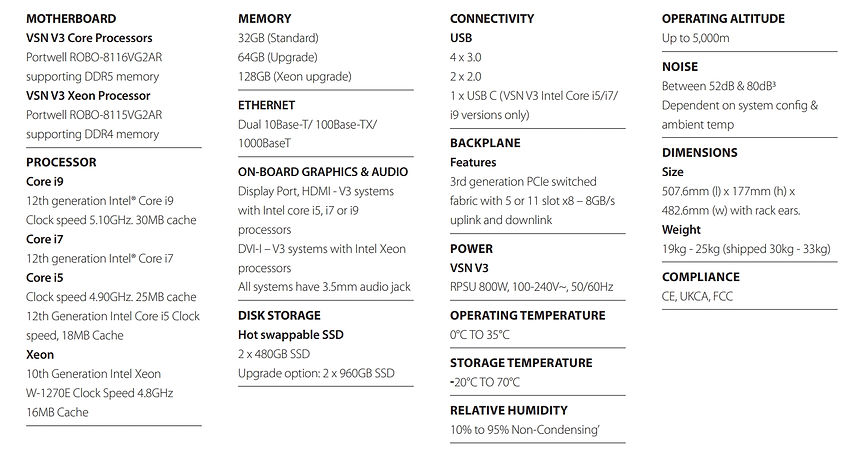
VSN V3
Scalable and Ultra-Secure Video Wall Controller

MISSION-CRITICAL VIDEO WALL CONTROLLERS
Datapath VSN controllers deliver high-performance, reliable video wall processing for control rooms, corporate spaces, and large-scale installations.
Configurable with Intel processors, Image graphics, Vision capture, and SQX IP decode cards to match project requirements.
POWER EFFICIENCY
The V3 generation improves power efficiency, cooling, and airflow for easier maintenance and reliable operation.
It supports Intel Core i9, Core i7, and Xeon processors with up to 128 GB of memory and USB 3.0 connectivity.
SPECIFICATION
VSNMini 300
Compact Solution for Powering Multi-Output Video Walls

SCALABLE CAPTURE AND DISPLAY
The VSNMini 300 is a compact, high-performance solution for multi-output video walls in meeting rooms, retail spaces, and control rooms.
It supports Intel processors, NVMe SSD storage, and configurable Datapath graphics, capture, and SQX IP decode cards.
RELIABILITY AND COMPATIBILITY
Built with industrial-grade components for reliable 24/7 operation in mission-critical environments. Compatible with Windows 10 and Windows 11, with flexible upgrade options available.
SPECIFICATION

VSNMicro 600
Smaller & Quieter High-Performance Video Wall Controller

FLEXIBLE VIDEO WALL CONTROLLER
The VSNMicro 600 is a compact, customizable video wall controller designed for command and control environments with limited space.
It supports Intel processors, flexible storage and memory configurations, and quiet operation for reliable deployment.
PERFORMANCE AND RELIABILITY
Features 12th Gen Intel Core processors, with upgrade options up to Core i7 and Core i9 for enhanced performance.
Built with industrial-grade components and compatible with Windows 10 LTSC and Windows 11 LTSC for dependable 24/7 operation.
SPECIFICATION


Video Wall Management Software
Powerful video wall management solutions for any application.
Datapath’s video wall solutions are trusted worldwide to power mission-critical and high-profile installations across a wide range of environments. From compact control rooms and corporate spaces to national defense, transportation hubs, and large-scale operations centers, Datapath delivers performance, flexibility, and reliability at every scale.
Aetria
The Complete Control Room Solution
Designed for mission-critical environments, Aetria enables centralized control and seamless integration of VSN-powered video walls with operator workstations, AVoIP, and KVM systems, ensuring total system coordination and situational awareness.
Manage
The configuration of all connectivity to workstations, video walls, sources, layouts, and templates is managed and operated from a single interface.
Monitor
Aetria monitors all solution components to ensure smooth operation and a swift response if issues occur.

Control
Users can focus on their core objectives rather than on how to make the technology work.
Automate
Automate responses with customizable workflows. Integrate third-party systems to keep your control room running smoothly.
Aetria Components
Datapath provide complete Aetria solutions, including all software and hardware components.


Aetria WallControl
Aetria WallControl is Datapath’s advanced video wall management software designed to integrate VSN-powered walls into the Aetria system. Built on proven WallControl technology, it enables complete control of multiple video walls from a single platform—supporting custom layouts, templates, and on-screen tools. With features such as multi-wall management, display control, HDMI source encoding, and user rights configuration, Aetria WallControl is ideal for complex, mission-critical environments.
Aetria WallControl: Connects VSN-powered video walls to Aetria for seamless control, with support for layouts, templates, OSD, and carousels.
Multi-Wall: Drive multiple video walls from a single VSN system with independent control and dedicated content sources for each wall.
Display Control: Control display power, brightness, and contrast directly from the Aetria Command Center.
Vision Encode: Capture HDMI and other sources for video wall display or H.264 streaming to remote locations.
User Rights Management: Assign role-based permissions to control user access to specific walls, sources, and layouts.


Command Center
Aetria Command Center provides a unified platform for managing and operating control room solutions. Operators can securely access and display real-time sources across local and global Aetria installations, while built-in monitoring and diagnostics ensure reliable system performance and rapid issue resolution.
•Centralized Management Platform
•Flexible Source Distribution
•Easy Project Setup
•Intuitive Web Interface
•Advanced Source Management
•Secure Multi-Site Connectivity
•One-Click Layout Deployment
•Intelligent Workflow Automation
•Centralized Health Monitoring
•Real-Time Pan & Zoom
•Role-Based Security
•Real-Time Diagnostics
•Fast & Easy Installation


Network Manager
The Aetria Network Manager is an appliance designed to simplify the setup and management of Aetria solutions. It comes pre-configured with Aetria Command Center software, enabling quick and easy deployment. With minimal installation requirements, the appliance only needs to be powered on and connected to the network to get started, making it an efficient and hassle-free solution for managing Aetria environments.


Aetria Touch
The sleek 10.1” Aetria Touch Panel provides secure and intuitive video wall control within the Aetria system. Featuring encrypted access, customizable layouts, source management, audio control, and display enhancements, it simplifies daily operations. The optional Touch Pro adds advanced touch gestures for positioning, resizing, and saving video wall layouts.

Operator Workstations
Aetria supports both Aetria Workstation and Aligo Workstation to meet diverse operational and IT requirements. Aetria Workstation provides flexible software -based source management and video wall sharing, while Aligo Workstation delivers responsive hardware-based KVM control with seamless multi-screen access to connected sources.
High-Performance Workstations
Datapath offers flexible options for powering operator workstations—designed to suit any use case, system architecture, or security requirement. Aetria and Aligo Workstations can be combined in a single installation, allowing a mix-and-match solution to suit your project needs and budget, giving every user the right tools and performance for their role.
Aetria Workstation
Aetria Workstation enables operators to monitor multiple sources on single- or multi-screen setups, share content to video walls, and integrate seamlessly with IT systems.

Aligo Workstation
Aligo Workstation gives operators real-time, multi-screen control with instant layout management and secure, hardware-driven access—no extra software or hardware needed.

WallControl 10
Advanced Video Wall Management Software
WallControl 10 is Datapath’s advanced video wall management software available on both the VSN and iolite ranges of video wall controllers. It allows users to manage and control content from a wide array of sources—including IP streams, video captures, and local applications—across video walls of any size or complexity.

Web Interface Access
Control video walls remotely from any compatible browser on laptops, tablets, or smartphones. The interface allows users to choose walls, apply layouts, and preview what is currently displayed via the Snapshot feature.
User Rights Management
Secure and manage access with role-based permissions. Assign user roles per wall using Windows login credentials—ideal for multi-user, multi-room control environments.
MultiWall Configuration
Easily configure and manage multiple independent walls from a single VSN system. Walls across different locations or zones can be driven and maintained from a central interface using the WallCreator setup wizard.


WallControl 10 for Genetec Security Center
Integrated video wall management software for security markets.
Integrated video wall control
Using WallControl 10 for Genetec Security Center, workstation operators can seamlessly drive video walls directly without needing to constantly switch between different applications.
The WallControl 10 plug-in is available directly in the Genetec interface. Using the simple plug-in interface, operators can send live or recorded camera feeds to the video wall. At the click of a button, the plug-in can be used to send a single camera to the wall or all the cameras present in the current view.
-
Share View
Display camera feeds from the operator’s current view directly onto the video wall within a selected zone for instant targeted monitoring. -
Track My View
Automatically send cameras from the operator’s view to the video wall, allowing uninterrupted focus without manual sharing. -
Extract Cameras
Highlight and send specific cameras from a carousel loop to the video wall, enabling focused attention on key feeds while others continue cycling locally. -
Deploy Layout Files
Easily deploy saved or custom layout files to the video wall, allowing a mix of video cameras, TV signals, or PC content to be displayed seamlessly. -
Camera Discovery
Automatically detect and configure all cameras available on the Genetec server, simplifying setup and ensuring accurate video wall content.
Why use WallControl 10 for Genetec Security Center
-
You have one or more medium- to large-scale video walls.
-
You require full capabilities of video wall control management software in a single application.
-
You would like to manage your video wall effectively without compromising the operators’ focus.
-
You need an efficient way to share cameras to a video wall.
-
You would like to create and save layouts and easily deploy them on screen.
WallControl 10 for Genetec Security Center Compatibility
The Plug-in is supported in Genetec Security Center version 5.11
Languages
WallControl 10 for Genetec Security Center software is available in Chinese, English, French, German, Italian, Polish, Japanese, Portuguese, Russian, Spanish, and Turkish.

WallControl 10 for Milestone XProtect®
Integrated video wall management software for security markets.
For the modern security suite
Designed for the security market, the WallControl 10 plug-in for Milestone XProtect® provides users with the ability to seamlessly drive multi-screen video walls directly within the XProtect interface without the need to switch between different applications.
Operatives can display a variety of sources, including direct camera feeds, television broadcasts and any other localised content onto their video walls.
-
Video Wall Zones
Define and pre-program multiple zones per video wall, configurable across single or multiple screens, for flexible and precise content management. -
Share View
Easily display live and recorded camera feeds from the operator’s view directly onto the video wall for instant access. -
Track My View
Automatically send cameras from an operator’s view to the video wall, allowing continuous focus without manual sharing. -
Extract Cameras
Select and display a specific camera from a carousel loop on the video wall for focused monitoring. -
Deploy Layout Files
Quickly deploy saved layouts or create new ones with a single click to customize video wall displays. -
User Rights Management
Assign management levels to users, prioritizing control over different video wall zones for secure and organized operation.
Why use WallControl 10 for Milestone XProtect
-
You have one or more medium to large-scale video walls.
-
You require full capabilities of video wall control management software in one application.
-
You would like to manage your video wall effectively without compromising the focus of the operators.
-
You need an efficient way to share cameras to a video wall.
-
You would like to create and save layouts, and easily deploy them on screen.
WallControl 10 for Milestone XProtect Compatibility
Driver version
6.4.3
6.4.6
6.4.6
6.4.11
6.4.18
6.4.23
6.4.23
Milestone version
2022 R3 - Corp
2023 R1 - Corp
2023 R2 - Corp
2023 R3 - Corp
2024 R1 - Corp
2024 R2 - Corp
2025 R1 - Corp
WC10 Version
1.12.8
1.13.0
1.13.1
1.13.2
1.14.1
1.14.2
1.14.2
WC10 Plugin Version
1.2.7
1.2.7
1.3.1
1.3.2
1.3.3
1.3.3
1.3.3
Please note that Essentials+ does not support plug-ins.
Languages
WallControl 10 for Milestone XProtect software is available in Chinese, English, French, German, Italian, Japanese, Polish, Portuguese, Russian, Spanish and Turkish.